
I uncover the process and workings of fine-tuning a large language model on a dataset. Scenario for fine-tuning a model can be on corporate data such as a knowledge base, product information, human resources. I walk you through the process and share my detailed observations.
What is Fine-tuning a large language model?
Involves adjusting a pre-trained model on a specific dataset. It also involves adjusting the model for a particular task to enhance its performance in that domain or task. This can make inference calls more responsive and less computationally intensive.
This blog post series will go over:
Part 1: Intro and overview of the KAITO fine-tuning workspace yaml
Part 2: Executing the Training Kubernetes Training Job
Part 3: Deploying the Fine-Tuned Model
Part 4: Evaluating the Fine-Tuned Model

The fine-tuning demo is inspired by the following online resources:
- Fine tune language models with KAITO on AKS
- Fine-Tuning Open-Source Models made easy with KAITO
- Kaito fine-tuning
What is the high level fine-tuning process given a pretrained model?
- Select a Pre-trained model: Large language models are trained on vast amounts of data. This training, often done on diverse and general datasets, helps the model learn a wide range of language patterns and knowledge. Models like GPT, falcon, Llama, Phi-3 and etc. My demo is using phi-3-mini model.
- Selecting a Task: Fine-tuning is usually task-specific. such as text classification, sentiment analysis, question answering, summarization, to more specialized tasks like medical diagnosis from text. We will look at question answering.
- Preparing the Dataset: You need a dataset that is representative of the task. This dataset must be labeled if the task is supervised. For instance, if the task is sentiment analysis, the dataset would need samples of text labeled with sentiments. The fine-tuning dataset used in the Kaito repo’s example is https://huggingface.co/datasets/philschmid/dolly-15k-oai-style
- Fine-Tuning: The model is trained on the task-specific dataset. This process adjusts the weights of the neural network to make the model better at the specific task. The learning rate used during fine-tuning is typically lower than during pre-training, as the goal is to make smaller, more refined adjustments to the model weights.
- Evaluation: After fine-tuning, the model is evaluated on a separate validation set to check its performance.
- Iteration: Depending on the results, further adjustments in the model or the fine-tuning process might be necessary to improve performance.
What is Phi-3-mini-128k?
- Phi-3 series of small language models
- designed to deliver large model performance in a compact, efficient package.
- offering the capabilities of significantly larger models while requiring far less computational power.
- This makes Phi-3 models ideal for many applications. They enhance mobile apps and power devices with stringent energy requirements.
- The Phi-3-Mini-128K-Instruct is a 3.8 billion-parameter, lightweight, state-of-the-art open model trained using the Phi-3 datasets. This dataset includes both synthetic data and filtered publicly available website data, with an emphasis on high-quality and reasoning-dense properties.
You can read more at https://techcommunity.microsoft.com/blog/machinelearningblog/affordable-innovation-unveiling-the-pricing-of-phi-3-slms-on-models-as-a-service/4156495
How to Fine-Tuning Phi-3-mini-128k-instruct base model with KAITO on AKS
Given that you have the Kubernetes AI Toolchain Operator (KAITO) installed on Azure Kubernetes Services, you can run this Kubernetes YAML manifest to start a training job.
apiVersion: kaito.sh/v1alpha1
kind: Workspace
metadata:
  name: workspace-tuning-phi-3
resource:
  instanceType: "Standard_NC24ads_A100_v4"
  labelSelector:
    matchLabels:
      app: tuning-phi-3
tuning:
  preset:
    name: phi-3-mini-128k-instruct
  method: qlora
  input:
    urls:
      - "https://huggingface.co/datasets/philschmid/dolly-15k-oai-style/resolve/main/data/train-00000-of-00001-54e3756291ca09c6.parquet?download=true"
  output:
    image: "rkimacr.azurecr.io/finetunedph3:0.0.1" # Tuning Output ACR Path
    imagePushSecret: acr-secret
Let me break it down.
Line 6: instanceType
The instanceType is the Node Pool VM Size of Standard_NC24ads_A100_v4.
The NC A100 v4 series virtual machine (VM) is a new addition to the Azure GPU family. You can use this series for real-world Azure Applied AI training and batch inference workloads. The NC A100 v4 series is powered by NVIDIA A100 PCIe GPU and third generation AMD EPYC™ 7V13 (Milan) processors.
The VM Specs:
vCPUs: 24
Memory (GiB): 220
GPUs: 1
GPU Name: NVIDIA A100
GPU RAM (GiB): 80
Cost is a whopping ~ $3,487.21USD/month
You can read more about this VM Series at https://learn.microsoft.com/en-us/azure/virtual-machines/sizes/gpu-accelerated/nca100v4-series?tabs=sizebasic
Line 12: preset name
phi-3-mini-128k-instruct. You can read more at https://huggingface.co/microsoft/Phi-3-mini-128k-instruct
Line 13: turning method
QLoRA is a finetuning technique that combines a high-precision computing technique with a low-precision storage method. This helps keep the model size small while still making sure the model is still highly performant and accurate.
You can read more at https://www.mercity.ai/blog-post/guide-to-fine-tuning-llms-with-lora-and-qlora#:~:text=QLoRA%20is%20a%20finetuning%20technique,still%20highly%20performant%20and%20accurate
Line 16: input urls
The input fine-tuning dataset to train the pretrained model.
https://huggingface.co/datasets/philschmid/dolly-15k-oai-style/resolve/main/data/train-00000-of-00001-54e3756291ca09c6.parquet?download=true
There are 15,000 rows. This is considered on the small scale. The more data the more effective at fine-tuning for a specific task. To look at the data go to dataset viewer: https://huggingface.co/datasets/philschmid/dolly-15k-oai-style/viewer/default/train?row=0
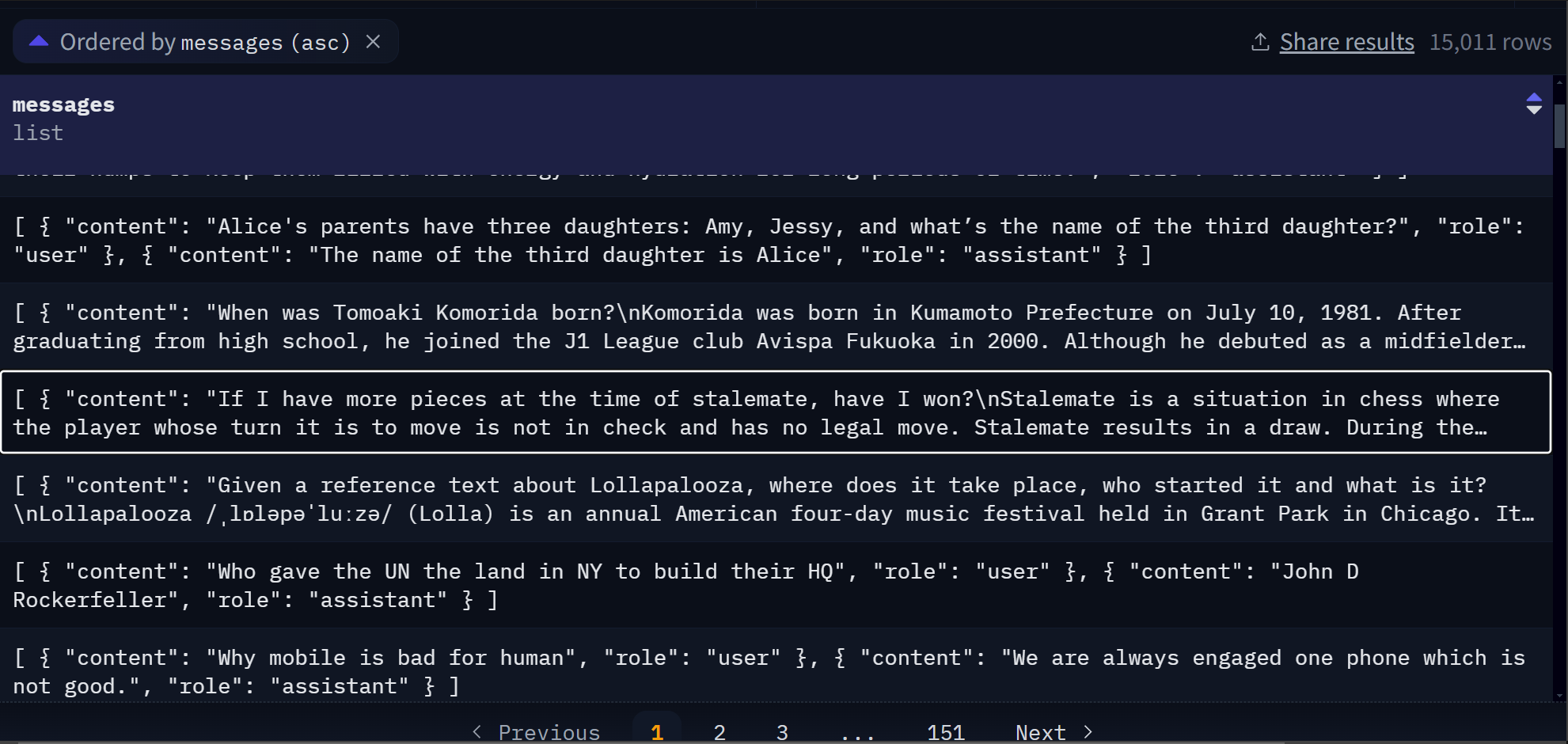
A fine tuning set is composed of question and answer pairs.
In this particular dataset, a row looks like:
[
  { "content": "Who gave the UN the land in NY to build their HQ", "role": "user" },
  { "content": "John D Rockerfeller", "role": "assistant" }
]
I have seen other fine-tuning datasets appear as simple as
[
  "Who gave the UN the land in NY to build their HQ?",
  "John D Rockerfeller
]
Line 18: tuning output
Once the model is trained, it is stored as an image into a container registry. I have setup my own azure container registry “rkimacr.azurecr.io/finetunedph3:0.0.1”. And access via an imagePush secret.
I have explained the technical concepts, preparation steps and the KAITO workspace YAML. Next is to execute by running $ kubectl apply -f kaito_workspace_tuning_phi_3.yaml.
Read the next blog post part 2.


Pingback: Deep Dive Into Fine-Tuning An LM Using KAITO on AKS – Part 2: Execution – Roy Kim on Azure and Microsoft 365
Pingback: Deep Dive Into Fine-Tuning An LM Using KAITO on AKS – Part 3: Deploying the FT Model – Roy Kim on Azure and Microsoft 365
Pingback: Deep Dive Into Fine-Tuning An LM Using KAITO on AKS – Part 4: Evaluation – Roy Kim on Azure and Microsoft 365
Pingback: Deep Dive Into Fine-Tuning An LM Using KAITO on AKS – Part 2: Execution – Roy Kim on Azure and AI