
I want to show the process of upgrading my AKS cluster that is a few major version behind and explain each step.
AKS upgrade options and process can be complicated. There are many details you have to be knowledgeable in order to plan for a wide array of upgrade scenarios and requirements. Especially when it comes to production environments.
Here are the AKS product documentation
- https://learn.microsoft.com/en-us/azure/aks/upgrade-aks-cluster?tabs=azure-cli
- https://learn.microsoft.com/en-us/azure/aks/upgrade-cluster
Here I summarize the AKS upgrade types

For upgrade types details: https://learn.microsoft.com/en-us/azure/architecture/operator-guides/aks/aks-upgrade-practices#update-types
My cluster setup
- My cluster is 2 node cluster used for demo purposes.
- The next supported major version is 1.26.10
- There is only one node pool called agentpool
I’m just showing you a basic upgrade process with the quick facts. There are two areas in AKS when it comes to upgrading
- Control Plane. This is managed by Microsoft and is a blackbox to the customer.
- Worker Plane. The is compose of node pools and within each node pool are each node virtual machine.
Node Pool Upgrades
Microsoft creates a new node image for AKS nodes approximately once per week. A node image contains up-to-date OS security patches, OS kernel updates, Kubernetes security updates, updated versions of binaries like kubelet, and component version updates
Cluster Upgrades
The Kubernetes community releases minor versions of Kubernetes approximately every three months. You can see a list of those releases at https://github.com/Azure/AKS/releases
A cluster upgrade can include a node pool upgrade. It is possible to upgrade control plane only if your Kubernetes version is 3 or more minor versions apart from the selected version.
In my AKS cluster, since the 1.23.10 version is so far behind, I have to upgrade both control plane and node pools.

My Node Pool’s VM has the Ubuntu Linux OS and K8s version 1.23.15 as shown.

To find the Node image version, click into each node to find it.

To proceed with the manual upgrade go to Cluster Configuration, click

I chose the next version available.

Since my current version is too far behind, I’m left with the upgrading both the control plane and node pool. You may consider control plane only to have more granular control for testing before upgrading all node pools. Click Save to initiate the upgrade process. It can take several to 20+ minutes.

The general process is that a new node with upgraded image is deployed into the node pool. AKS begins evicting pods from the existing nodes in the node pool being upgraded. This is done gracefully to minimize disruption. Pods are scheduled onto the new node with the updated Kubernetes version. While it is upgrading, you can monitor progress and any issues in the Events blade.

Looking at the Node Pool, we see it is in Upgrading state, the Target nodes count increased from 2 to 3 to support a new node with updated version. And the Kubernetes version is 1.26.10 indicating its intended version.

Clicking into the agent node pool, we can see the 3 nodes. The third one being a new and updated version. You can see the number of pods as they are being rescheduled to the new nodes.

After some time, we see the cluster as completed the upgrade.
The node pool image has been updated

Each node in the node pool updated with the respective number of Pods rescheduled into them.
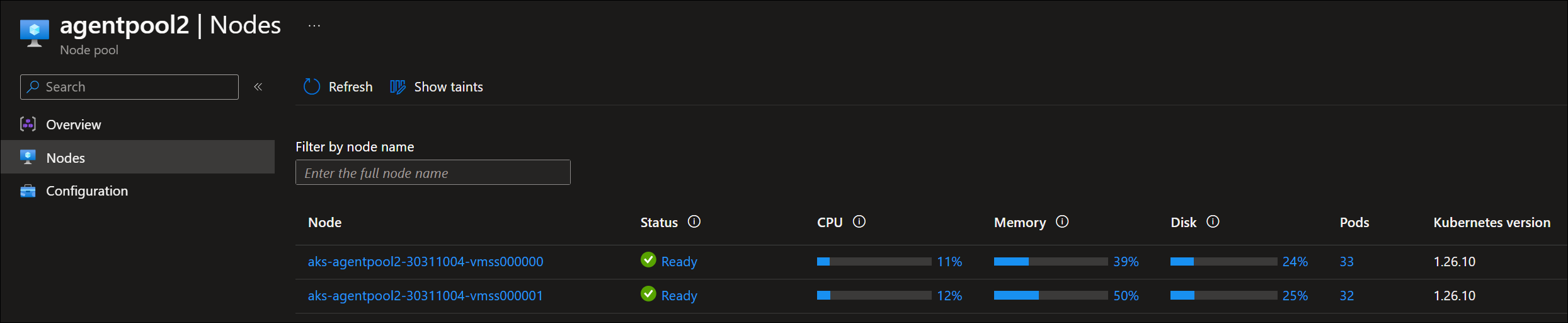
And we can confirm as well in the Cluster Configuration blade

Since I was a few versions behind, I can am now able to upgrade to the next supported version.

Final Thoughts
Upgrading an AKS cluster can be quite straight forward as I have show, but there are a ton of details that need to take into account for production scenarios and the complexity of your AKS cluster configuration and the OSS software components deployed. So highly encourage to take the time to read throug documentation.
Resources
- https://learn.microsoft.com/en-us/azure/aks/upgrade-aks-cluster?tabs=azure-cli
- https://learn.microsoft.com/en-us/azure/architecture/operator-guides/aks/aks-upgrade-practices#background-and-types-of-updates
- https://learn.microsoft.com/en-us/azure/aks/node-image-upgrade
- https://github.com/Azure/AKS/releases
 Roy Kim on Azure and AI